

Managing Your Website Navigation Menu in Wix Studio
- Jun 17
- 2 min read
As your business grows, it's completely normal for your website to grow with it.
Whether you're adding a new service, creating a landing page, launching a course, or reorganizing your website, you'll likely need to update your navigation menu from time to time.
In Wix Studio, your website navigation is managed within the Full Mode Editor.
This tutorial assumes you're already familiar with Wix's two editing environments. If not, we recommend starting with our guide to Content Mode vs. Full Mode Editor before continuing.
Access the Full Mode Editor
The Full Mode Editor can be accessed from your Dashboard by selecting the appropriate editing option.

Adding a New Menu Item
To add a new page to your website navigation:
Click on your Site Menu (if your site has a Horizontal Menu, it will resemble the screenshot below. If your site has a Hamburger Menu, please see the following screenshot)
Select Manage Menu
Click + Add Item
Choose what you'd like to add to your menu - most common is 'Site Pages'
Choose which page(s) to appear within your navigation.
Click Add to Menu
Publish your changes when you're ready.

If your site has a Hamburger Menu, your steps may begin like this:
Click on the Hamburger Menu icon
Select Edit Menu
Select 'Manage Menu' & follow steps 3-7 as listed above


Reordering Your Navigation
You can easily change the order of your navigation menu by dragging and dropping pages within the Manage Menu panel.

Renaming a Menu Item
Need to update the wording in your navigation?
Simply select the page you'd like to rename, update the page title, and save your changes.
Keep menu titles short, descriptive, and easy to understand.
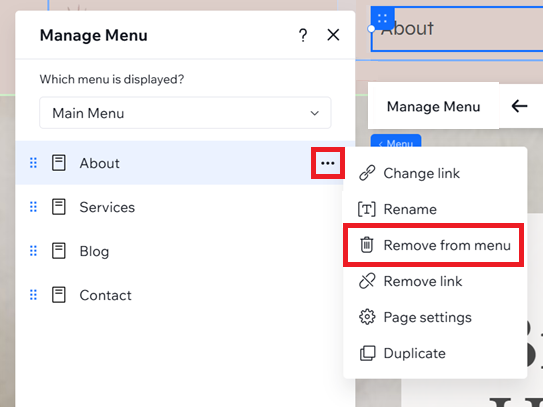
Removing a Page from Your Navigation
To remove a page from your navigation, simply select the page you'd like to remove, and save your changes.
A Few Best Practices
As your website evolves, keep these tips in mind:
Keep your main navigation simple and easy to scan.
Group similar pages together whenever possible by adding a Dropdown
Avoid adding too many top-level menu items.
Consider adding less vital menu items to a footer menu to keep the primary menu uncluttered.
A clean, well-organized navigation makes it easier for visitors to find the information they're looking for—and creates a better overall experience on your website.


Comments